Skufy Trader
Trader terminals and NPCs, buying and selling by item condition, limited stock with restocks, any currency, a bank with ATMs, a phone and a laptop, clans, pay day, safe zones and a handy in-game admin panel. Every file and every parameter is described here.
What it does
15 kinds of vending terminals (weapons, ammo, clothes, food…) and live NPC traders — 31 looks and any clothes. Placed with a hologram from the admin panel.
Cards with 3D previews, item stats, selling anything from the inventory, prices by condition and fill level, ammo inside magazines counted.
Magazines, ammo and attachments by slot are matched to the chosen weapon or gear — from this trader or all of them. Bought in one click and mounted on the item.
Any product can be limited: it runs out, restocks on a timer, and items sold by players go back into stock.
Its own SKUFY money (notes and coins) or the money of another mod. On first start the mod detects TraderPlus, MoneyRuble and Expansion. Several currencies — one per trader.
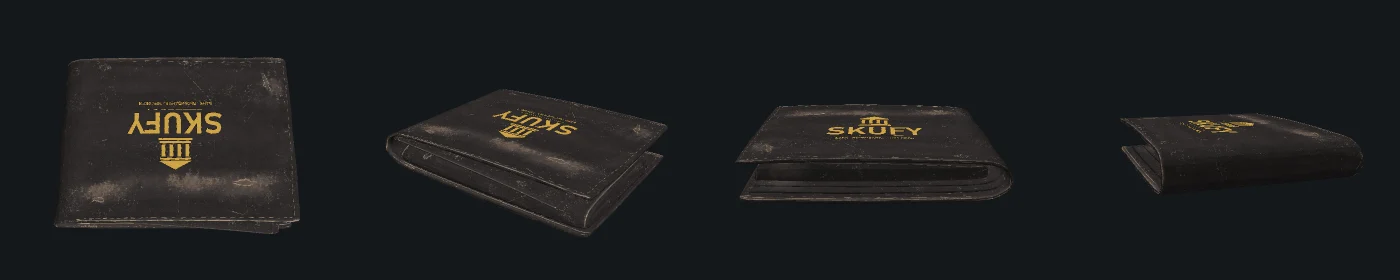
SKUFY wallet: 10 money-only cells and a pocket per denomination. Money is counted across the whole inventory, change is given in large notes.
An account for every player, ATMs in three paints, withdraw, deposit, transfers, fees, paying for purchases straight from the account.
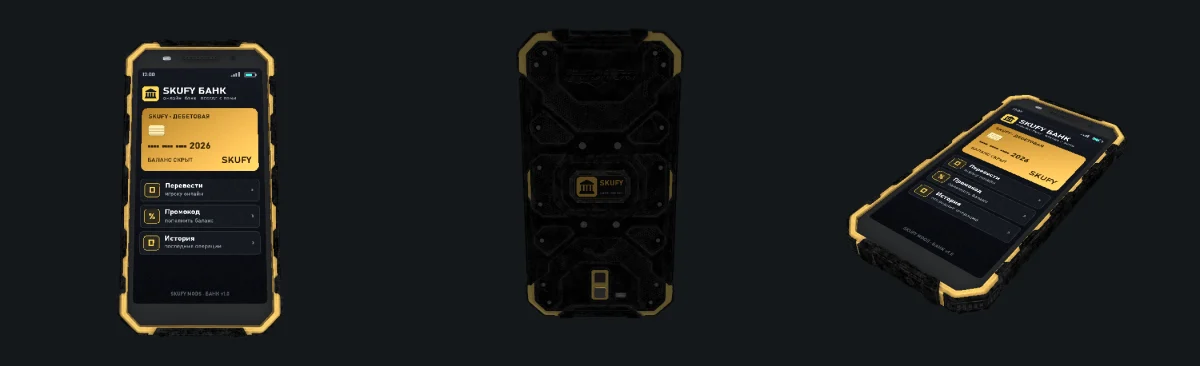
Mobile bank on a rugged phone: balance, history, transfers and admin promo codes from anywhere on the map. Each opening drains the battery.
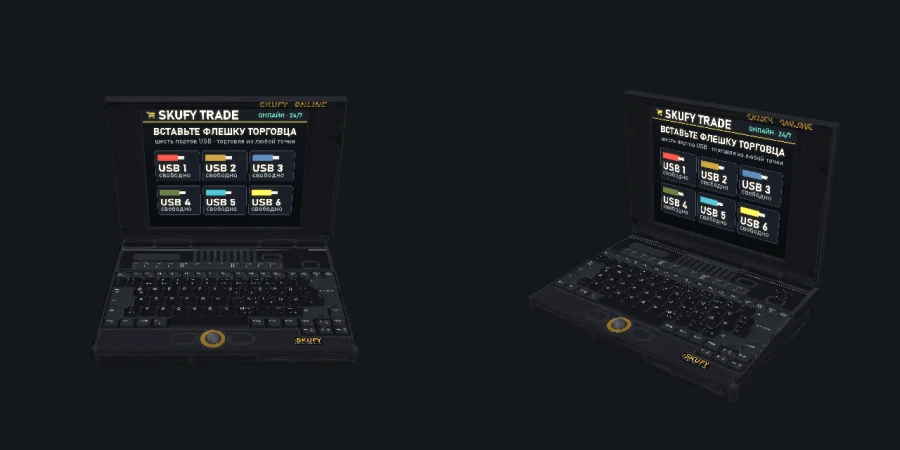
A laptop with 6 USB ports: plug in a trader's flash drive and trade with it from anywhere.
Clan accounts with withdraw rights, a salary for everyone per minutes of play and personal salaries.
Cars and boats with all parts: to a delivery spot next to the trader or straight into the Skufy Garage.
No damage, weapons can't be raised, no infected, names over heads, no restraining, no-signal areas.

Installation
- Copy the
@Skufy_Traderfolder to the server and add it to the-mod=launch parameter (clients the same way, or via the Steam Workshop). - Put the
Skufy.bikeykey from@Skufy_Trader/Keysinto the server'skeysfolder. - No other mods are needed: Community Framework is not required. With Skufy Garage installed, bought vehicles can go straight into the garage.
- Start the server once — the mod creates the
profiles/Skufy_Traderfolder with all files. - Add your SteamID64 to
AdminSteamIds(see Admins), restart the server, join and press Num 8.
First start
On the first start the mod writes one file per trader kind into Traders/ — with the full assortment and prices, but without any places on the map. That is why there are no traders in the world right after installation: you place them.
- Open the admin panel (Num 8) → tab ТОРГОВЦЫ (Traders) and pick a trader.
- In ТОЧКИ НА КАРТЕ (places on the map) press + ТЕРМИНАЛ (terminal) or + NPC and place the hologram: LMB — place, Q/E — rotate, PageUp/PageDown — up/down, RMB — cancel.
- For the car dealer add a МЕСТО ВЫДАЧИ (delivery spot) — bought vehicles appear there.
- Press СОХРАНИТЬ (Save): the server writes the files and respawns the traders right away.
Admins
The admin panel opens only for players whose SteamID64 (17 digits, starts with 7656119) is in the AdminSteamIds list of Settings.json. Find yours on steamid.io or in your Steam profile URL.
"AdminSteamIds": [
    "76561198000000001",
    "76561198000000002"
],
- It is easier to add admins in the panel itself: НАСТРОЙКИ → АДМИНЫ И NPC (Settings → Admins and NPC). You cannot remove yourself — the panel never locks you out.
- In single player (offline) every player is an admin — handy for testing.
Config files
TradeLog is on).Editing by hand
- The easiest way is the admin panel or the web editor: no way to break commas and quotes.
- Edit by hand while the server is stopped: saving from the panel overwrites the files. On a running server press ПЕРЕЧИТАТЬ ФАЙЛЫ (reload files) (Settings tab) after editing.
- It is JSON: strings in double quotes, commas between elements, no comma after the last one.
//comments are not allowed in JSON — except inside a product line. - Switches can be written as
1/0ortrue/false. TheHelpfield is just a hint. - If a file cannot be read, the server log shows a line
[Skufy_Trader] ERRORwith the reason.
Product line
Each product is one string in the category's Items list. Fields are separated by commas, everything after // is a comment (the panel writes the item name there):
-1 — the trader does not sell it, only buys it.Final price = Buy × the trader’s BuyMultiplier.DefaultSellRatio.Final = Sell × SellMultiplier × the condition factor (SellByCondition).0 or empty — never runs out. N — at most N in stock: runs out and comes back with restocks.-1 — the usual amount (full ammo pile, full bottle), N — exactly N.Examples
"AKM, 8000, 4000 // AKM"                  sells for 8000, buys for 4000
"AKM, 8000"                               buys for 8000 × DefaultSellRatio = 4000
"AKM, -1, 3000"                           only buys
"NVGoggles, 15000, 7000, 3"               at most 3 in stock
"Ammo_762x39, 300, 150, 0, 20"            endless, 20 rounds per purchase
Settings.json
Common mod settings. Under each default value is the allowed range: anything outside it is corrected by the mod on load.
Currency
Name, Sign — written after a sum, Items — money classes and their values (ClassName, Value).The first currency is the main one: the bank, ATMs, pay day and the wallet work in it. Traders with another currency do not take payment from the account.Currencies.0 — not accepted in that condition."Currencies": [ { "Name": "Rubles", "Sign": "rub.", "Items": [ { "ClassName": "Skufy_TR_Coin1", "Value": 1 }, { "ClassName": "Skufy_TR_Ruble100", "Value": 100 }, { "ClassName": "Skufy_TR_Ruble5000", "Value": 5000 } ] } ],
Trading & stock
0 — no automatic restock (only the panel button).Logs/trade_<date>.log.Bank, phone, clans, pay day
Name, Look (0 — graphite, 1 — emerald, 2 — bordeaux), Pos [x, y, z], Yaw. Easier to place with the hologram in the panel.Id (SteamID64), Name, Amount, Minutes. Override the common one; Amount 0 — no salary for that player.Safe zones
SafeZonesOn switches all zones at once. Each zone in the SafeZones list is a circle on the map (height is ignored). Zones can be nested — e.g. a safe square inside a large no-signal area.
Trader file
The file Traders/<id>.json. There can be any number of traders — e.g. two gun shops in different towns with different prices. File name = trader ID (Latin letters, no spaces).
0 — into Skufy Garage (if installed and there is room), else to the delivery spot; 1 — garage only; 2 — delivery spot only.Skufy_TR_Usb_<Kind>), "-" — no online trading, or your own class.Currencies. Empty — the main one.Name, Icon and the Items list (product lines).Trader kinds (Kind)
Place on the map (Places)
0 — vending terminal, 1 — NPC.SurvivorM_ Mirek, Boris, Cyril, Denis, Elias, Francis, Guo, Hassan, Indar, Jose, Kaito, Lewis, Manua, Niki, Oliver, Peter, Quinn, Rolf, Seth, Taiki or SurvivorF_ Eva, Frida, Gabi, Helga, Irena, Judy, Keiko, Linda, Maria, Naomi, Baty.NpcClothing from the settings.Category icons (Icon)
Vehicles
Vehicles are sold like any product (the vehicles kind is the car dealer). Vehicles.json sets the parts they come with. A vehicle not listed there gets its parts picked automatically by slots.
{
    "Presets": [
        {
            "Vehicle": "OffroadHatchback",
            "Parts": ["CarBattery", "CarRadiator", "SparkPlug", "HatchbackWheel", "HatchbackWheel", "HatchbackWheel", "HatchbackWheel"]
        }
    ]
}- Delivery spot — at the trader's place (the МЕСТО ВЫДАЧИ (delivery spot) button in the panel). Without it a vehicle can only go to the garage.
- Garage — when Skufy Garage is installed and
GarageLinkis on. The mode is set per trader inVehicleDelivery. - Fluids on delivery —
VehicleFluidsin the settings.
Accounts, clans, promo codes
These files are written by the server. Balances and promo codes are easier to change in the admin panel (tabs БАНК (Bank), КЛАНОВЫЕ СЧЕТА (Clan accounts), ПРОМОКОДЫ (Promo codes)).
Out — the member may withdraw from the treasury.Admin panel (Num 8)
All edits stay in the panel until you press СОХРАНИТЬ (Save): then the server writes the files and respawns the traders. ОТМЕНИТЬ ИЗМЕНЕНИЯ (discard changes) brings everything back.
- НОВЫЙ ТОРГОВЕЦ (new trader) — kind and name, with the default goods or empty; КОПИЯ (copy); УДАЛИТЬ (delete, a copy goes to Backups).
- Properties: name, enabled, buy and sell multipliers, “buys everything” and its share, vehicle delivery, flash drive, currency.
- Roaming trader: minutes per place and ПЕРЕЕХАТЬ СЕЙЧАС (move now).
- ТОЧКИ НА КАРТЕ (places): + terminal, + NPC, move, delivery spot, teleport, delete; NPC look and clothes.
- Categories: order, name, icon, delete.
- Goods table: buy, sell, stock and quantity edited right in the cells, order, delete.
- Bulk price changes and moving ticked goods В ДРУГУЮ КАТЕГОРИЮ (to another category).
- ДОБАВИТЬ ТОВАР (add product) — search over every class of the game and mods, 3D preview on hover.
- Currency categories (up to 5): money classes, values, sign after a sum.
- Sell price by condition: pristine … ruined.
- Trade rules: max per purchase, distance, notifications, trade log, vehicles to the garage.
- Stock and ПОПОЛНИТЬ ВЕСЬ СКЛАД (restock everything).
- АДМИНЫ И NPC: admin SteamID64s, default NPC clothes.
- ПЕРЕЧИТАТЬ ФАЙЛЫ (reload files) and ВЫДАТЬ СЕБЕ 100 000 (ТЕСТ) (give yourself 100 000 for tests).
- Vehicle list and its КОМПЛЕКТАЦИЯ (parts).
- ПОДОБРАТЬ ПО СЛОТАМ (auto-fill by slots); УБРАТЬ ПРЕСЕТ (remove the preset).
- + БАНКОМАТ (+ ATM) with the hologram, paint (graphite, emerald, bordeaux), name, teleport.
- Bank settings: bank on, pay from the account, transfers, starting balance, limit, fees.
- СЧЕТА ИГРОКОВ (player accounts): search, + credit, set the balance.
- A salary for everyone: amount and every how many minutes of play.
- ЛИЧНАЯ ЗАРПЛАТА (personal salary) for chosen players.
- Pay now — for testing.
- Clan list: treasury, members.
- УСТАНОВИТЬ КАЗНУ (set the treasury), disband (the money goes to the owner).
- Clan settings: creation price, max members.
- + БЕЗОПАСНАЯ ЗОНА (safe zone) and + ЗОНА БЕЗ СВЯЗИ (no-signal zone) — centred where the admin stands.
- Radius and every zone property, teleport.
- ПОКАЗЫВАТЬ ГРАНИЦЫ ЗОН — dots along the borders on the ground (admin only).
- НОВЫЙ ПРОМОКОД (new promo code): code, sum onto the account, how many players, active, note; who already used it.
- Mobile bank switch and battery cost per opening.
How players trade
Trade window
- At a terminal — the “Trade” action, at an NPC — “Talk to the trader”.
- КУПИТЬ (buy): categories and search on the left, cards with 3D previews, amount and the buy button on the right. Tabs ХАРАКТЕРИСТИКИ (stats: damage, rate of fire, slots, protection, calories…) and КОМПЛЕКТ (kit: what fits the item). Mouse wheel click on a card — full-screen view.
- ПРОДАТЬ (sell): everything the trader buys, priced by condition. Tick rows and sell — or sell everything from bags and pockets. Items inside an item are sold with it.
- The СЧЁТ (account) toggle in the header — pay from the SKUFY BANK account; sales also go onto the account.
ATM
The “Use the ATM” action: withdraw (paid out in notes and coins), deposit (a sum or all the cash), transfer to a player online, clan (create a clan, pay in, withdraw, members and rights), history. It also shows the salary and the time to the next one.
Phone
The Skufy_TR_Phone phone with a SKUFY POWER battery (Skufy_TR_PhoneBattery). In hands — “Open SKUFY BANK”, in a vehicle — the “SKUFY BANK (phone)” action. Balance, history, transfers and promo codes. Each opening costs PhoneCharge% of the battery; it does not work in a no-signal zone.
Laptop & flash drives
The Skufy_TR_Laptop laptop has 6 USB ports. Plug in trader flash drives (Skufy_TR_Usb_weapons, …_food etc.) and choose “Open the laptop”: each drive opens its trader from anywhere on the map. All of this is sold by the general trader by default.
Troubleshooting
The admin panel does not open on Num 8
Check that your SteamID64 (17 digits) is in AdminSteamIds and restart the server. Check the key in Settings → Controls → Trader admin panel.
No traders on the map after installation
That is expected: the first start creates files with goods but without places. Place the traders in the panel: ТОРГОВЦЫ → + ТЕРМИНАЛ / + NPC → СОХРАНИТЬ.
I changed the JSON but nothing changed in game
Edit files with the server stopped, or press ПЕРЕЧИТАТЬ ФАЙЛЫ (reload files) after editing. Saving from the panel overwrites the files — an unsaved manual edit is lost. A broken file shows [Skufy_Trader] ERROR in the server log.
A trader does not sell or buy an item
Check the class (a typo → no such item in the game) and the price: -1 as buy — not sold, as sell — not bought. The stock may have run out. Money is never sold to a trader.
I need the money of another mod
TraderPlus, MoneyRuble and Expansion are picked up on first start. For any other mod put its classes and values into ВАЛЮТА И ЦЕНЫ (or Currencies).
A bought vehicle did not appear
The trader's place needs a delivery spot (modes 0 and 2); for the garage Skufy Garage must be installed and have room (modes 0 and 1).
The laptop or the phone does not work
Check OnlineTrade / PhoneBank, the phone battery, and whether the player stands in a no-signal zone. A drive does not open a trader with Usb: "-".
I deleted a trader by mistake
A copy is in Backups/. Move the file back to Traders/ (removing the date from its name) and press ПЕРЕЧИТАТЬ ФАЙЛЫ.