
SKUFYMOD
DayZ mod · version 1.0

SM UI

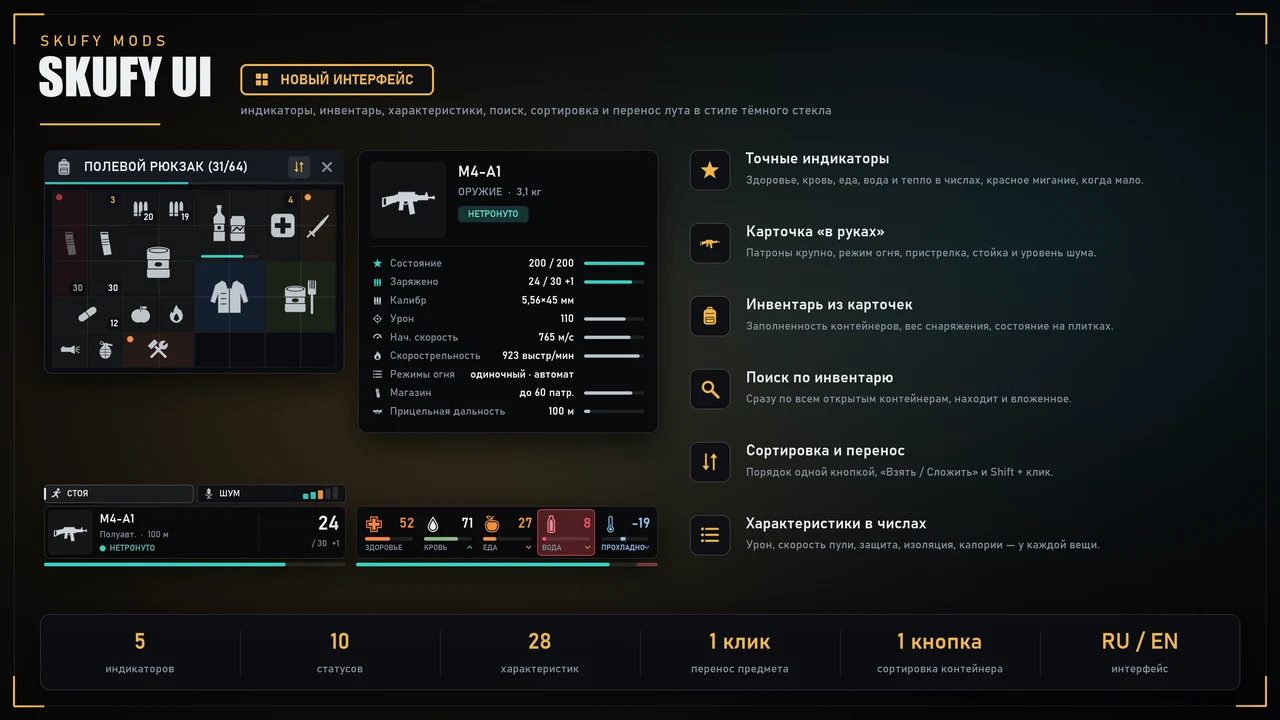
DayZ's new dark glass interface features precise indicators that flash red when low, along with status indicators for diseases, bleeding, and clothing soaking. A weapon card with ammo and noise is displayed in your hands. An inventory of individual cards allows you to search through all containers and sort loot. Stats for each item are displayed numerically when hovered over and in the inspection window.

1 500 ₽
To download, you need to sign in with Steam and add a project (your server) in your account.

Dependencies

(пусто — зависимостей нет)

Description

A complete redesign of the DayZ interface in the dark glass style of the Skufy series: indicators with precise values, a card of what you're holding, an inventory with search and loot sorting, and detailed stats for each item. Everything is calm and dark, with only important items highlighted in color: low water, bleeding, broken. The interface is in Russian and English.

Repackaging, editing, and reuploading the mod are prohibited.

Indicators

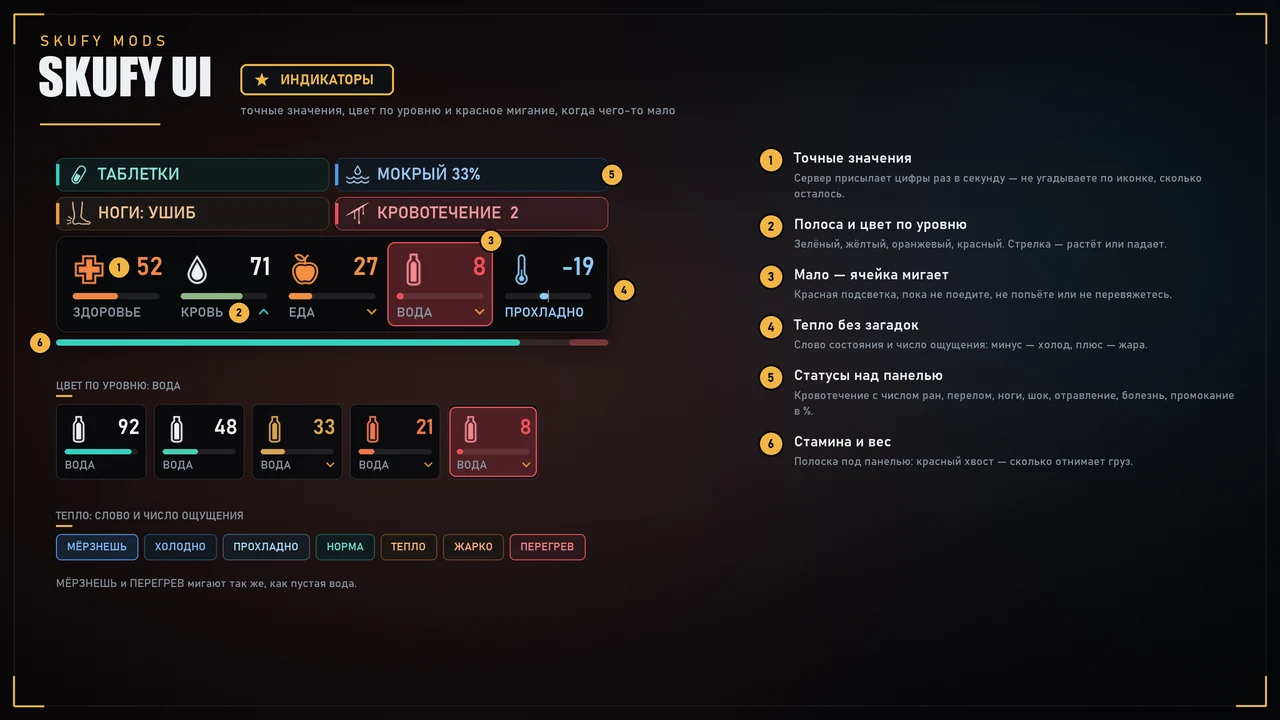
  • Health, blood, food, water — precise values ​​(the server sends them once per second), a bar, and a trend arrow.
  • The color changes according to the value: turquoise means everything is fine, orange means it's time to think, and red means danger.
  • When the indicator is low, the cell flashes with a red border; extreme cold flashes blue.
  • Heat: sensation number (0 - comfort, minus - cold, plus - hot) and word: COOL, COLD, FREEZING, WARM, HOT, OVERHEAT.
  • Statuses above the panel: bleeding with wound count, fracture, leg injury (3rd degree), shock percentage, poisoning, illness, overeating, pill effects.
  • Clothing moisture percentage - damp, wet, soaked.
  • Stamina below the panel: shows how much weight is absorbed; when full, it fades.

What's in your hands

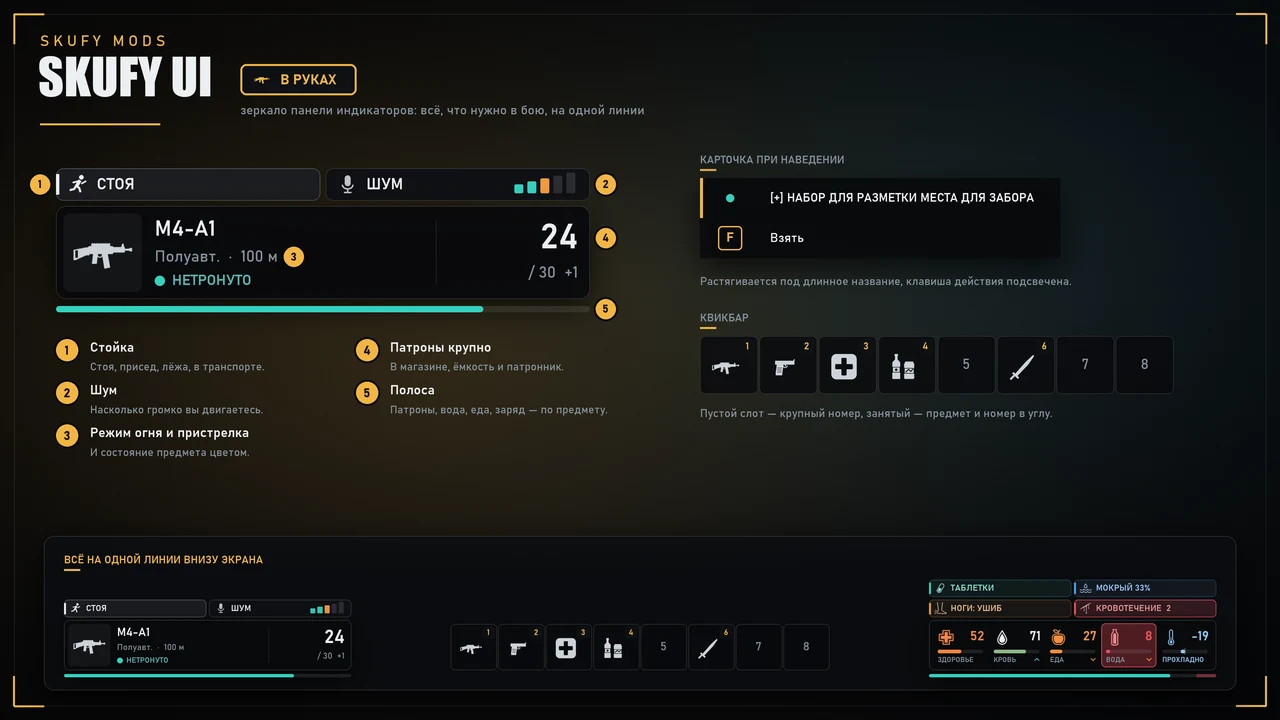
  • Item preview, name, fire mode and zeroing, condition.
  • Ammo closeup: 24 / 30 +1 (in the magazine and in the chamber). For other items, it shows the remaining or ammo.
  • Bar under the card: ammo, remaining, or condition.
  • Stance and Noise Level (5 bars) — how much zombies can hear you.
  • The quickbar is in the same style. The card in your hands, the quickbar, and the indicators are aligned.
  • The hover window and action bars are recolored, the action key is highlighted, and long names are kept within the frame.

Inventory

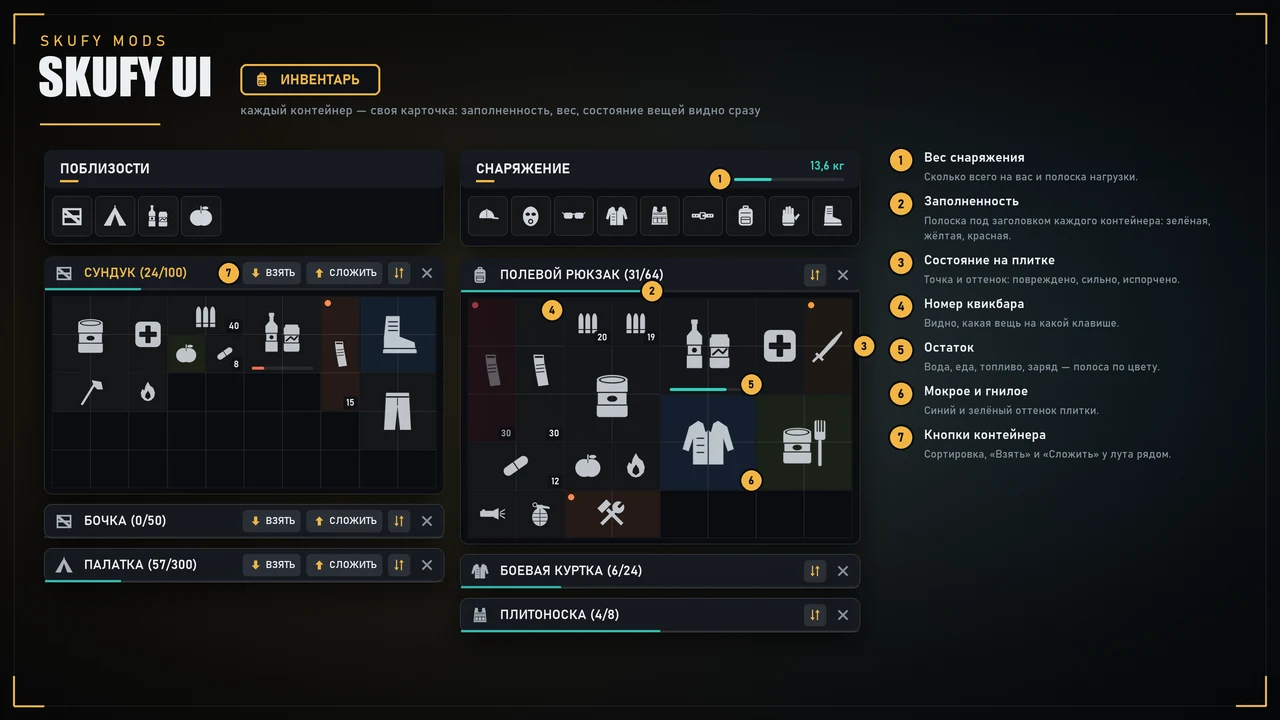
  • Each container is a separate card. The header shows a fill level bar: turquoise, orange, and red.
  • The equipment header shows the weight of everything you're wearing and a load bar: you can see when the weight starts to drain your stamina.
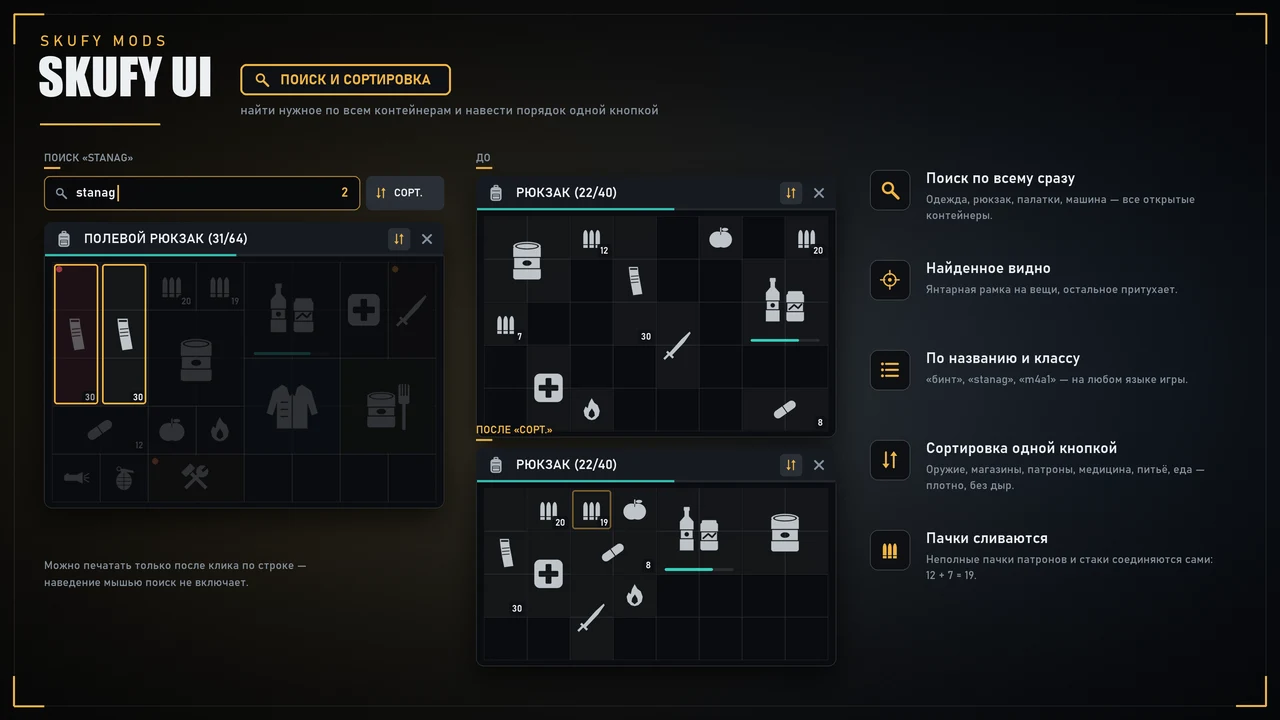
  • Items: damaged items are highlighted with a color and a status dot, spoiled items are darkened, wet and rotten items are marked, the quantity bar is color-coded, and the quickbar slot number is in the corner. - Search all open containers at once: clothing, backpack, tents, vehicle. Searches by name and class (stanag, m4a1). Found items are in an amber frame, the container containing the find is in a pale frame, and the rest is dimmed. There's a counter for found items.

Loot Sorting

  • The sort button is in the header of any container with slots—your own and the one next to it.
  • The "SORT" button next to the search sorts all equipped clothing and the backpack.
  • Partial stacks (ammo, rags, etc.) are merged first.
  • Then the layout from the upper left corner: weapons, magazines, ammo, medicine, drinks, food, other items, clothing. Within a group, large items are sorted first.
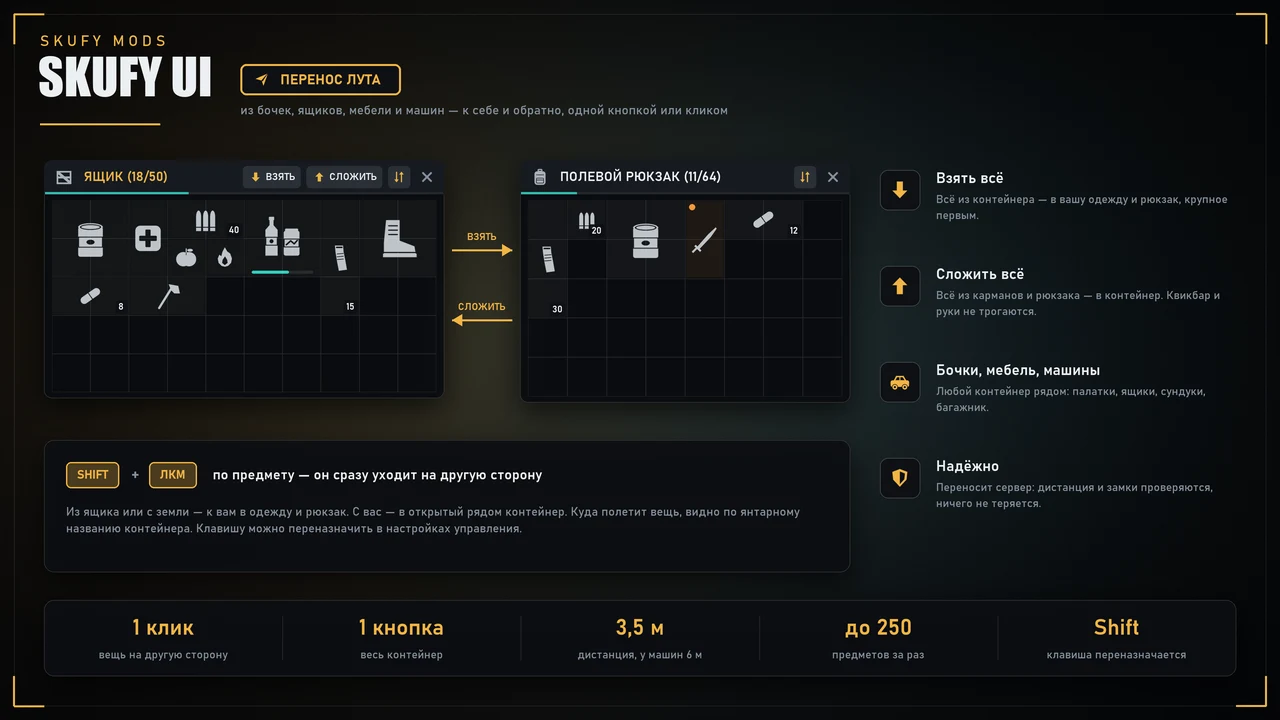
  • The server handles everything: the container must be nearby (up to 3.5 m) or on you; locked containers are not sorted.

Item Stats

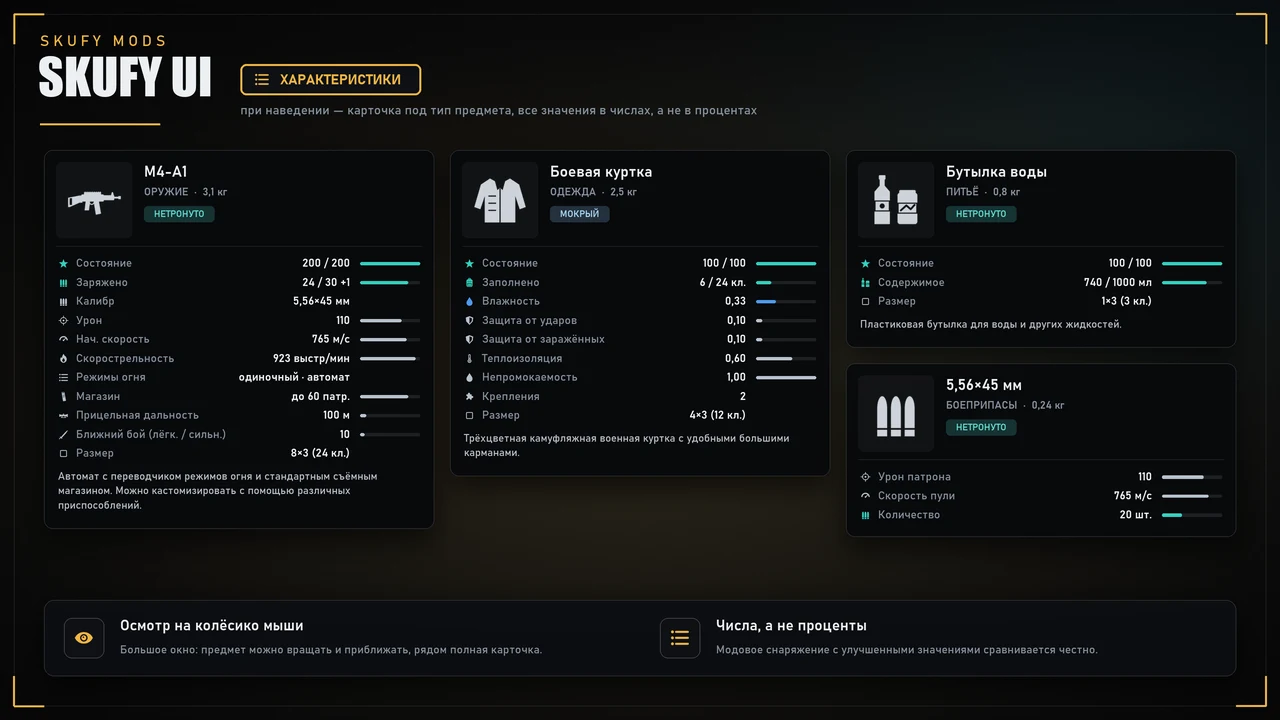
  • When hovering over an item, a card for the item type appears: preview, category and weight, condition, humidity, temperature, food stage, description.
  • Weapons: loaded, caliber, damage, muzzle velocity, rate of fire, fire modes, magazine, aiming range, melee damage.
  • Clothing: pocket filling, bullet, impact, and infected protection, thermal insulation, waterproofness, mounts.
  • Ammo and Magazines: quantity, damage, bullet velocity.
  • Food and Drink: calories and water for what's left, volume.
  • Battery Items: charge.
  • Everything is in numbers, not percentages — modded gear with improved values ​​is compared fairly.
  • Mouse wheel inspection — a large window: the item on a dark scene (rotate and zoom with the mouse) and the full stat sheet.

Reviews 5 · 1

Sedoy 08.10.2026

Шматко мать его ... это не мододел, это цифровой экзорцист! Запомните этот день 7/10/2026, когда у седого волосы стали обратно чернеть.. это просто разрыв шаблона. Взял я у него мод на UI, думал, просто кнопочки покрасивее станут (как обычно гайд до конца не прочитал). Ага, щас! Этот человек не просто перекрасил интерфейс, он заставил меня поверить, что я играю в новую игру, тут тебе и интерфейс, и поиск в ивнентаре, и сортировку, и тултип.. да дофига всего. А самое главное, что этот мод легкий и заменяет 3 мода !!! Но самое нестандартное началось после покупки мода. У меня был второй мод, который работал примерно как проститука — прикольный, нужный, но уже старый, использованный, знает как работать, но не может. Я спросил у @Шматко помощи типа подогнать под новый UI. А этот гений просто залез в мод, починил, прикрутил обратно и еще, кажется, душу туда вдохнул. И все это за пару часов. Я еще на сервер обновки не залил, а у меня уже руки чешутся купить у него еще что-нибудь.. глаз зацепился за охоту. Эти моды как наркотик, только легальный, с пользой для нервной системы, пользователей и на зависть Богемии. @Шматко , ты красавчег (Красавчег - забытый падонкавский жаргон, обозначающий крутой, мощный, красивый, правильный, в общем все положительные эпитеты доступные для произнесения ртом.)! P.S. Не покупайте моды!!! не хочу, что бы еще у кого нить такая красотулька была.

Purchase FAQ

What does the purchase give access to?

The purchase is tied to your Steam account. Before buying, make sure you are signed in with the right account.

Where do I download the files after buying?

In your account, section “My mods”. The installation instructions and extra info are there too.

How do I top up my balance?

In your account click “Top up” — payment goes through YooMoney (bank card or wallet). The balance is credited automatically within a couple of minutes.

What does a subscription give?

Access to all mods of the bundle for the subscription period. Subscriptions never renew automatically — no hidden charges.

Where do I get support?

In our Discord — the link is at the bottom of the page.